How to Collect School Fees When the Internet Is Down
Ask any school accountant in Pakistan what their worst morning looks like and you will hear the same answer: it is the first of the month, there are forty parents in the corridor, and the internet is gone. Not for an hour — for the day.
What happens next is almost always the same. Somebody finds a register. Payments get written on loose paper, or on the back of a challan. The counter keeps moving because it has to. And then, two days later, somebody spends an entire afternoon typing those slips into the system and arguing about the three that do not add up.
Why cloud-only software fails exactly when you need it
Most school management systems are entirely cloud-based, which is fine until the connection is not. When the browser cannot reach the server, the fee counter simply stops. The software is not broken; it is just somewhere you cannot get to.
Schools cope in the ways you would expect, and every one of them costs something:
- Send parents away. They came on the due date and are told to come again. Collection slips and the office takes the blame.
- Write on paper. Fast at the counter, expensive afterwards — hours of re-entry, and the receipt a parent holds does not match anything in the system.
- Use a mobile hotspot. Works until the whole area is down, and nobody budgeted for a day of tethering.
A different approach: take the day out, bring the money back
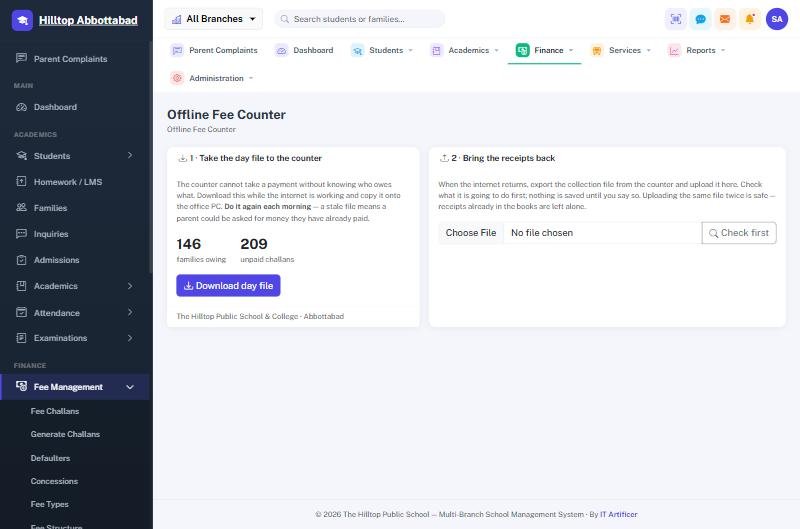
School Smart ERP ships with a small till that lives on the office computer. It is not a second copy of the whole system and it does not need its own server. It does exactly one job — take fee payments — and it does that job whether or not there is a connection.
The working day looks like this:
1. Take the day file out — two clicks
Before the outage, or first thing on a morning you expect trouble, you export the day file. It carries every family, every unpaid challan and every balance. On a school of a few hundred students it is around a hundred kilobytes and takes a fraction of a second.
2. Keep collecting
A parent arrives. The clerk finds the student, takes cash or a bank slip, and prints a receipt. It is the same receipt the parents already recognise, with the same school header and the same numbering series — not a scrap of paper that will raise questions later.
3. One click back
When the line returns, you upload the collection file. Every receipt posts into the system, every ledger entry writes itself, and the day's cash book balances without anyone typing a number twice.
The part that matters: nothing double-counts
The honest question about any offline system is what happens when somebody makes a mistake — uploads the same file twice, or uploads yesterday's file today. This is where most file-based approaches fall over and quietly create duplicate receipts.
Every receipt taken at the offline counter carries its own permanent identity, generated on the office computer and never reused. On the way back in, the system checks each one against what it already holds and reports it as one of four things:
- Ready — new, and about to be posted.
- Already recorded — seen before, skipped. This is what you see if you upload twice.
- Overpaid — the amount is more than the balance; shown for a human to approve.
- Problem — something does not match, and it is held back rather than guessed at.
You see those four numbers before anything is written. Nothing is posted silently.
What it does not try to do
It is worth being plain about the limits, because a tool that claims to do everything usually does nothing well. The offline counter collects fees. It does not mark attendance, enter exam marks, admit students or run payroll. Those can wait a day; a parent standing at the counter with cash in hand cannot.
It also assumes outages are short — hours, or a day or two. It is not a way to run a school permanently offline, and we would rather tell you that than sell you something that disappoints in month three.
Frequently asked questions
Does the parent get a different receipt?
No. Same format, same school branding, same numbering series. A parent cannot tell the difference, which is the point.
What if two counters collect at the same time?
Each counter's receipts carry their own identity, so two offices can collect from the same day file and both files import cleanly.
Does it need a separate licence or server?
No. It runs on an ordinary office PC with no extra monthly fee, and it is included with the system.
What happens to the accounting entries?
They post when the collection file comes back, dated to the day the money was actually taken — not the day it was uploaded. Your cash book reads correctly.
The honest summary
Internet in Pakistan is better than it was and still not something to stake a month's collection on. You can either plan for the bad days or spend them writing in a register. See how the offline fee counter works, or ask us for a demo and we will show you an outage from both sides of the counter.
Run your school the smart way
Book a free demo of School Smart ERP for your school or college.
Request a Free Demo