Let Parents Speak: Voice Note Complaints for Schools
Every school has a complaints process on paper. In practice, complaints arrive by WhatsApp to whichever teacher's number a parent happens to have, at the gate at home time, or in a phone call to the office that nobody writes down.
The result is familiar: the school genuinely does not know how many complaints are open, how long they have been waiting, or whether the last one was ever answered.
Why written complaint forms do not get used
Most school systems offer a complaints form. Almost nobody fills it in, for reasons that have nothing to do with the software:
- A lot of parents are not comfortable writing at length, in English or in Urdu.
- Typing on a phone is slow, and the thing they want to say takes two sentences of speech and a paragraph of writing.
- A form feels formal. Parents escalate to formality only when they are already angry.
So the complaint goes to WhatsApp instead, where it is invisible to the school as an organisation.
Let them talk
In School Smart ERP a parent can hold a button in the app and simply say what is wrong, in whatever language they speak. The recording attaches to their child, lands in the school's complaint list, and starts a clock.
Parents who would never have written anything use it immediately, because it is the thing they already do forty times a day on WhatsApp. The difference is where it arrives: in the school's system, attached to a student, visible to the people whose job it is to answer.
The school can reply by voice too
A reply typed by an administrator reads as a form letter. The same words spoken by the class teacher do not. For a worried parent, hearing a familiar voice say "I have spoken to her, she is fine, here is what we are doing" settles the matter in a way no written reply manages.
The three numbers a principal should watch
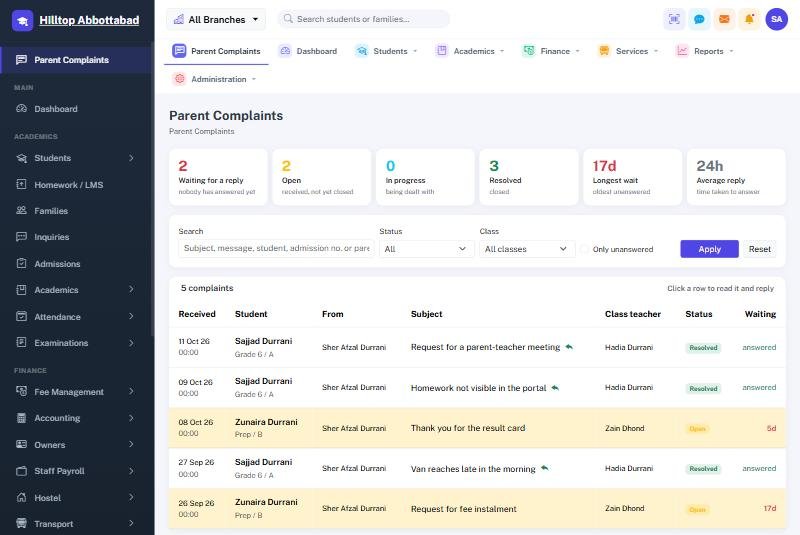
Logging complaints is only useful if somebody looks at the shape of them. The complaints screen leads with three figures:
- Waiting for a reply. Not total complaints — the ones where a parent is still waiting on you. This is the only number that needs action today.
- Oldest unanswered. In days. One complaint sitting for three weeks does more damage than thirty answered in a day.
- Average reply time. The number that tells you whether the process is working at all.
Everything else — filter by class, by status, search the text — is there for when you need it. These three are for the ten seconds a principal actually has.
Who can see what
Complaints are sensitive, and the rules are strict: a parent sees only their own, a class teacher sees their own class, and the administration sees everything. A teacher cannot browse another class's complaints, and a student cannot open their parent's recording at all.
Frequently asked questions
What languages can parents use?
Any. It is a voice recording, not a form — Urdu, Pashto, Punjabi, Sindhi, English, or a mix, which is how most people actually speak.
What if a parent would rather write?
They still can. Voice is an option, not a replacement.
Can we reply in writing to a voice complaint?
Yes, either way, whichever suits the message.
Is there a record?
Yes. The recording, the reply and the timings are all kept against the student, so a conversation six months ago can be found.
Why this matters more than it sounds
Most parent anger is not about the original problem. It is about having raised something and heard nothing back. A system that makes complaints easy to send and visible to answer fixes the second half — which is the half schools control. See how the complaints module works or book a demo.
Run your school the smart way
Book a free demo of School Smart ERP for your school or college.
Request a Free Demo