School Management Software in Pakistan: A 2026 Buyer’s Guide
Most private schools in Pakistan now know they need software. The harder question is which software. Every vendor shows a colourful dashboard in the demo, but the problems only appear three months later: challans that do not match the fee card, a system that stops when the internet goes, parents who never receive the SMS, or data you cannot take with you if you leave.
This guide is written for school owners, principals and administrators who are about to choose a school management system (also called a school ERP). It focuses on the things that matter in Pakistani schools specifically, and gives you questions you can put to any vendor, including us.
1. Start with fee management, not the dashboard
For almost every private school, fees are the reason to buy software. If fee collection works, the system pays for itself; if it does not, nothing else matters. In the demo, ask the vendor to show you a real month, not a slide:
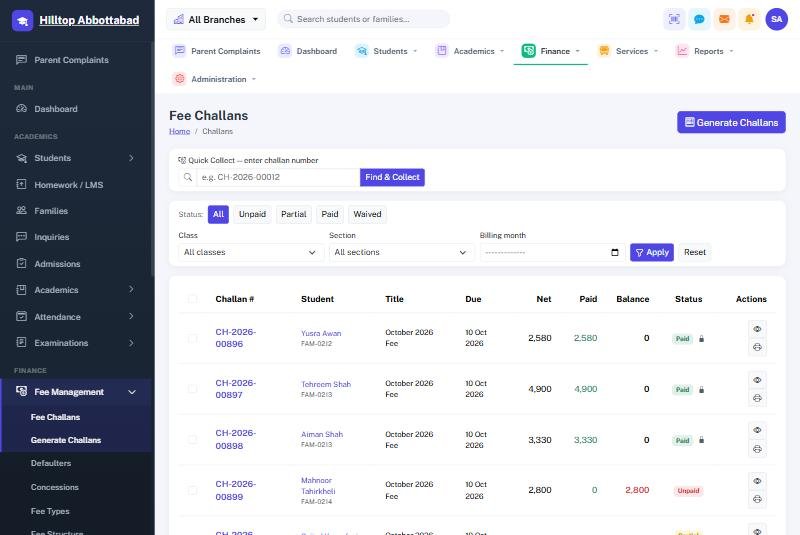
- Monthly challan generation for the whole school in one step, with Bank, School and Parent copies on one sheet.
- Arrears carried forward automatically, so last month’s unpaid fee appears on this month’s challan without anyone retyping it.
- Concessions and sibling discounts applied by rule, not edited by hand on each challan.
- Late fee / fine after the due date, and a clear “payable after due date” amount on the challan.
- Partial payments recorded correctly, with a receipt and the balance still visible.
- A defaulters list you can filter by class, section and amount, and act on the same day.
Then ask the most revealing question of all: “If a parent says they paid, how quickly can your system show me the receipt, who received it and which account it went to?” A good system answers in seconds.
If you are still collecting fees in registers, our guide on digitalizing fee collection in Pakistani schools explains how to make the switch without disturbing the office.
2. It must keep working when the internet does not
Load-shedding and patchy internet are a fact of life in many cities and almost every small town. A fully online system that shows a spinning wheel at the fee counter on the 10th of the month will be abandoned within weeks.
Ask whether the software has an offline fee counter or offline mode that lets the office keep receiving fees and printing receipts, and then synchronises safely when the connection returns, without duplicate receipts. We explain how this works in collecting school fees when the internet is down.
3. Communication parents actually read
Parents in Pakistan respond to SMS and to apps on their phones, not to email. Check that the system can:
- Send SMS in Urdu and English, individually or to a whole class, and keep a message log.
- Run automatic messages: absence alerts, fee reminders before the due date, and defaulter reminders after it.
- Offer a parent mobile app where parents see attendance, homework, results, fee challans and notices, and receive push notifications.
- Let parents raise a complaint and track it, so issues reach the principal instead of social media.
See how a parent mobile app improves school-home communication for what good looks like.
4. Academics and exams that match the Pakistani system
Result cards, gazette sheets and position holders are taken very seriously by parents. Make sure the software supports your exam pattern (terms, monthly tests, send-ups), your grade scale, subject-wise marks entry by teachers, printed result cards, class-wise gazettes and automatic position holders. If you prepare students for BISE Matric and Intermediate, ask how the system helps with board-exam tracking.
Also check the everyday tools teachers will use: timetables, student and teacher attendance (manual, biometric or RFID), homework / LMS and the yearly planner.
5. Staff, payroll and accounts in the same system
Salaries are usually a school’s largest expense. A complete school ERP should calculate payroll from attendance and leave, handle advances and deductions, print payslips and post salaries to the accounts automatically. Look for a proper chart of accounts, cash book, bank book, trial balance, profit & loss and balance sheet, so your accountant is not maintaining a second set of books in Excel. Our article on school staff payroll in Pakistan goes into detail.
6. Multiple branches, one picture
If you run (or plan to run) more than one campus, insist on true multi-branch support: each branch works independently with its own users and permissions, while the owner sees consolidated fee collection, defaulters and income across all branches. Retro-fitting this later is painful.
7. Your data, your security
Student records, CNICs, phone numbers and fee history are sensitive. Before you sign, ask:
- Who owns the data? You should be able to export everything (students, families, fee history) at any time.
- Where is it hosted and how is it backed up? Ask for automatic daily backups and how a restore works.
- Who can see what? Role-based permissions (accountant, teacher, principal, owner) and an activity log of who changed what.
- Is the system kept up to date and monitored for security?
Read more in security and data privacy for educational institutions in Pakistan.
8. Migration, training and local support
The best software fails if nobody moves your existing data or trains your staff. Ask whether the vendor will import your current students, families and outstanding fees from Excel or your old system, how long it takes, and who checks the totals. Ask about training for the office and teachers, and whether support is available by phone and WhatsApp during school hours in your language. Our guide to switching school software without losing your data covers the migration step by step.
9. Understand the real cost
Compare vendors on the full cost over two or three years, not just the first invoice. Ask about setup or installation charges, the monthly or yearly fee and what happens when your student count grows, SMS costs, the parent app, extra branches, training, and any charge to export your data if you leave.
A quick vendor checklist
- Show me a full month of challan generation, payment and defaulters, live.
- Show me the fee counter working with the internet switched off.
- Send a test Urdu SMS and an app notification to my phone.
- Print a result card and gazette in our exam pattern.
- Show payroll posting into the accounts.
- Show me how I export all my data.
- Tell me who I call when something goes wrong, and how fast you answer.
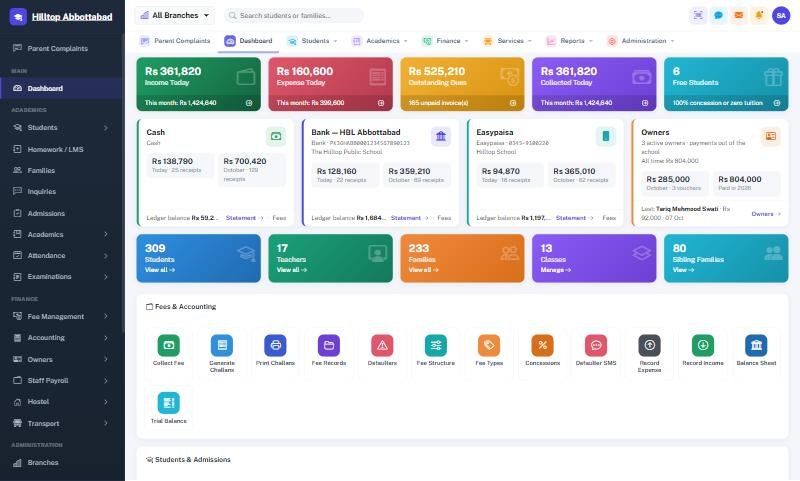
School Smart ERP was built in Pakistan for exactly these needs: fee challans with arrears and concessions, an offline fee counter, Urdu/English SMS automations, a parent app, exams and result cards, payroll and full accounting, multi-branch reporting and daily backups. If you would like to put it through this checklist, book a free demo and we will walk through it with your own data.
Frequently asked questions
What is the best school management software in Pakistan?
The best system is the one that fits how Pakistani schools actually work: monthly fee challans with arrears and concessions, an offline fee counter, Urdu and English SMS, result cards and gazettes in your exam pattern, payroll with accounts, and local support. Test any vendor against those points with your own data before you decide.
How much does school management software cost in Pakistan?
Costs vary by vendor and by the number of students, branches and modules. Compare the total over two or three years, including setup charges, the monthly or yearly fee, SMS costs, the parent app and any charge for exporting your data.
Can school software work without the internet?
Good school software should. Look for an offline fee counter or offline mode that keeps fee collection and receipts running during load-shedding or internet outages and then synchronises safely once the connection returns.
Can we move our existing student and fee data into new software?
Yes. A good vendor will import your students, families and outstanding fee balances from Excel or your old system and help you verify the totals before you go live.
Run your school the smart way
Book a free demo of School Smart ERP for your school or college.
Request a Free Demo