What Is a School ERP? A Complete Guide for School Owners and Principals
If you run a school, you have probably heard the words school ERP, school management system and student information system used for the same thing. This guide explains, without jargon, what a school ERP actually is, what it replaces in your office, and how to judge whether one is right for your institution.
School ERP, in one sentence
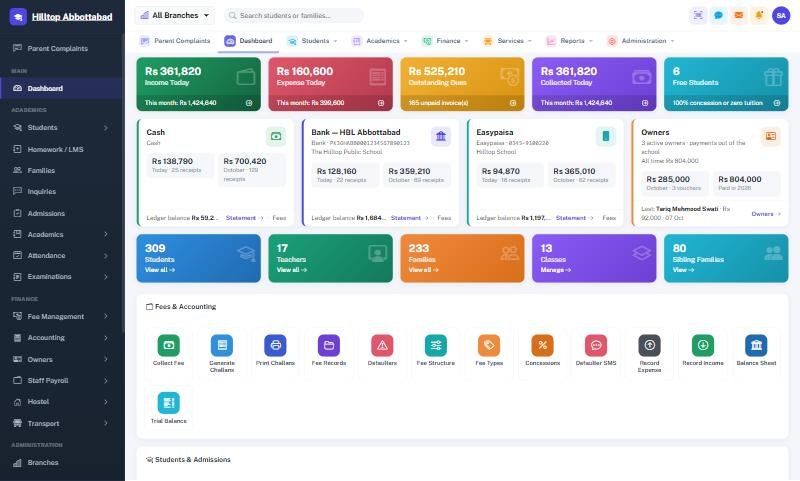
A school ERP (Enterprise Resource Planning) is one piece of software where every department of your school — admissions, fees, attendance, exams, accounts, payroll and parent communication — works from the same set of data instead of separate registers, Excel files and WhatsApp groups.
The key word is same. When a student is admitted, the fee challan, the attendance register, the exam sheet and the parent app all know about that student at once. Nobody types the name four times.
What a school ERP replaces
- Admission registers and paper forms that get lost or damaged.
- Hand-written or Excel fee challans and the end-of-month hunt for who has paid.
- Attendance registers that nobody totals until the end of term.
- Result sheets compiled by teachers over a week of late evenings.
- Cash books and ledgers kept separately by the accountant.
- Salary sheets where absences are counted by hand.
- Phone calls from parents asking about fees, results and attendance.
The core modules every school needs
1. Students and admissions
Complete student profiles with photos, documents, admission and roll numbers, family and sibling links, printable ID cards and bulk class promotion at the end of the year. A good system also records enquiries and admission tests so you can see how many enquiries became admissions.
2. Fees and challans
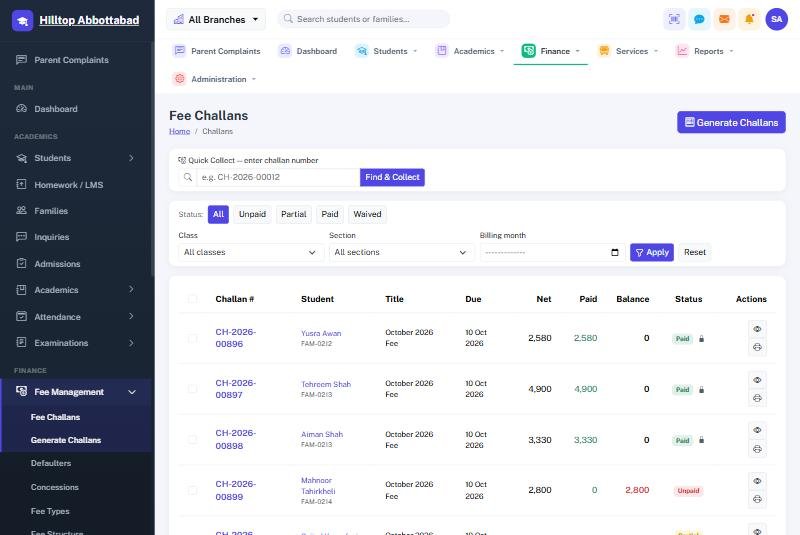
This is where most schools feel the difference first. Fee heads and class-wise structures are defined once; monthly challans for the whole school are generated in one click with sibling discounts and concessions applied automatically. Defaulter lists update themselves. Read our guide on collecting school fees faster for the details.
3. Attendance
Teachers mark attendance by class or from a phone, or a biometric device at the gate does it for them. Monthly summaries and percentages are ready without anyone adding columns. See how biometric attendance works in schools.
4. Exams and result cards
Marks are entered once; grades, GPA and positions are calculated using your own grade scale, and result cards print in a professional format. Results can be published straight to the parent app.
5. Accounts and payroll
Every fee receipt and expense posts into a proper set of books — ledger, cash book, bank book, trial balance and profit & loss. Payroll pulls absences from the attendance register and prints payslips.
6. Communication and the parent app
Notices, SMS alerts and a branded parent app mean parents see attendance, fees, homework and results on their phone. The office phone stops ringing for routine questions.
What a school ERP is not
An ERP is not just a website, and it is not only an LMS (online classes). Some products sell a parent app or a fee module alone and call it an ERP. A real school ERP connects administration, finance, academics and communication. If the fee module does not know about attendance, or the accounts do not receive fee receipts automatically, it is a collection of tools rather than an ERP.
Cloud, offline or both?
Most modern school ERPs run in the cloud, which means you can open them from any browser and your data is backed up off-site. The weakness is the internet: in many cities a fee counter goes silent the moment the connection drops. School Smart ERP solves this with an offline fee counter that keeps collecting and posts everything when the line returns. We compare the options in cloud vs offline school software.
Is your school ready for an ERP?
You do not need hundreds of students to benefit. Schools usually switch when one of these becomes true:
- Fee collection or defaulter tracking takes more than a day each month.
- Results take longer than three days to compile after exams.
- You are opening a second campus or branch.
- Owners cannot see collection and expense figures without asking the accountant.
- Parents are asking for an app because other schools nearby have one.
We wrote a short list of five signs your school needs an ERP if you want to check yourself.
How to choose one
Ask for a live demo using your fee structure, check whether your existing data can be imported, ask what happens when the internet is down, and ask who trains your staff. Our school management software buyer's guide walks through every question.
Frequently asked questions
Is a school ERP the same as a school management system?
Yes, in everyday use the terms mean the same thing. "ERP" stresses that every department shares one database.
How long does it take to set up?
A single-campus school with clean Excel data can usually go live in one to two weeks. See our first 30 days implementation plan.
Can teachers who are not good with computers use it?
Yes. Teachers mostly mark attendance and enter marks, which takes a few minutes to learn, often from the mobile app.
Want to see a school ERP running on real school data? Book a free demo of School Smart ERP or explore every feature.
Run your school the smart way
Book a free demo of School Smart ERP for your school or college.
Request a Free Demo