
School Fee Management in Bannu: Family Challans, Mobile Payments and Fewer Defaulters
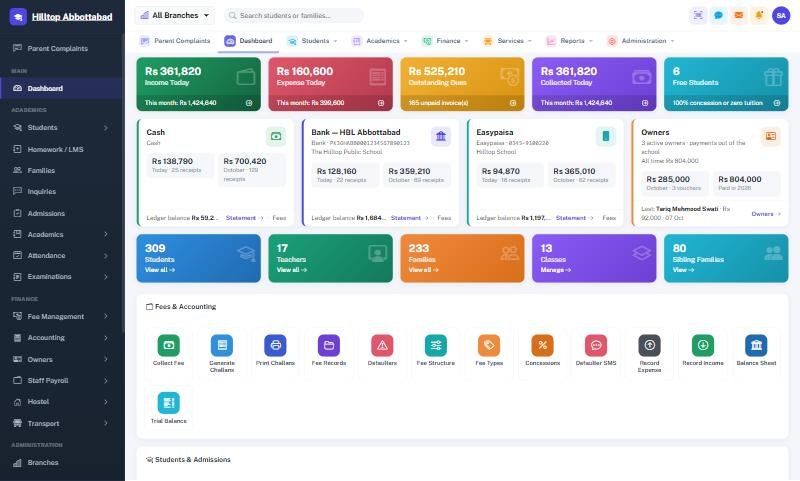
For many private schools in Bannu, the hardest part of the job is not teaching — it is getting fees in on time. Large families mean several brothers and sisters in the same school, often in different classes, with dues recorded on different pages of different registers. Arrears build up quietly until the end of the year. This guide explains how school fee management software helps Bannu schools bring fee recovery under control.
Problem 1: One family, many pages
When three children of one family sit in Class 2, Class 5 and Class 8, a register-based office keeps three separate fee records. The father pays at the counter, the clerk has to find all three, and a sibling discount is applied — or forgotten — by hand.
The fix: bill the family, not just the student. In School Smart ERP every family has a code, and fees are billed per family, so all siblings appear on one challan with one balance. Sibling discounts and standing concessions are applied automatically every month.
Problem 2: Defaulters nobody is tracking
Arrears that are not visible are not collected. A good system makes the defaulter list a live report, not a month-end project:
- Every payment updates the family's balance immediately.
- The defaulter list can be filtered by class, campus, amount or number of months due.
- Arrears carry forward correctly onto the next challan.
- Concessions and waivers are recorded with a reason and an audit trail.
Problem 3: Reminders that depend on phone calls
Calling every defaulting family takes days. Automated SMS reminders can be scheduled once — for example, three days before the due date and again a week after it — and then send themselves. Parents with smartphones also see their dues in the parent app.
Problem 4: Payments outside the counter
Many parents now pay through JazzCash, Easypaisa or a bank deposit rather than in cash. Each of these needs to be matched to the right challan and posted to the right account. In School Smart ERP, payments by Easypaisa, JazzCash, cheque or bank are recorded against the challan and post automatically to the bank account in the books, while cash posts to cash in hand. The accountant's ledger, cash book and bank book stay correct without re-entry — see school accounting software.
Problem 5: The counter stops when the power does
Load-shedding on the 10th of the month means a queue of parents and nowhere to record their payments. The offline fee counter keeps collecting on an office PC through any outage, printing the same receipts with the same numbering, and posts everything when the connection returns.
What changes in the first month
- Your students are grouped into families, and existing balances and arrears are imported from your registers or Excel.
- You check the imported totals against your own figures.
- The next month's challans are generated for the whole school in one click.
- The defaulter list and SMS reminders run from day one.
Our guide to collecting school fees faster covers more techniques that work alongside the software.
Frequently asked questions
Can schools in Domel, Kakki or Lakki Marwat use it?
Yes. It is cloud-based, with offline fee collection for campuses on a weak connection.
Can we give different discounts to different families?
Yes. Sibling rules apply automatically, and individual concessions can be set per student or per family with a recorded reason.
Running a school in Bannu? Visit school management software in Bannu or book a free demo and bring your fee register.
Run your school the smart way
Book a free demo of School Smart ERP for your school or college.
Request a Free Demo