
Multi-Branch School Management Software
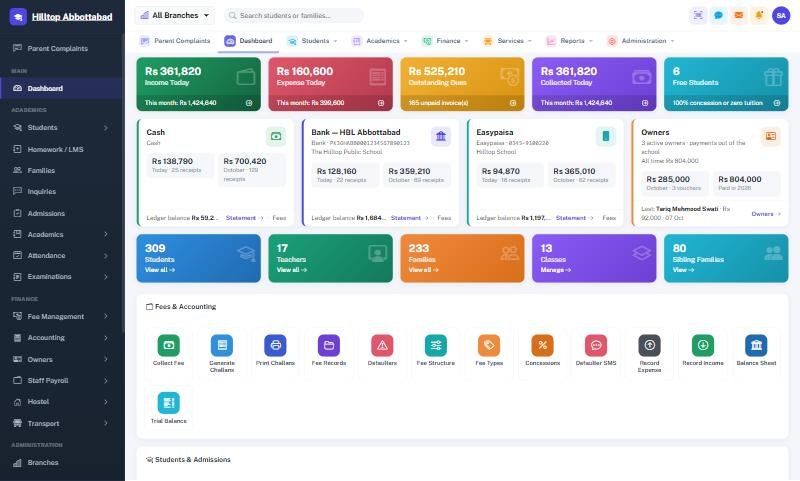
Run several campuses from one account: each branch manages its own students, fees and accounts, while owners switch between them or see every branch together.
Every campus on its own — and all of them together
When a school grows from one building into several, the owner usually ends up phoning each campus for its numbers, waiting for spreadsheets, and adding them up by hand. Each branch drifts into its own way of doing fees and results.
School Smart ERP was built for groups. Every record belongs to a branch, so each campus works independently, while the super admin chooses one branch or All Branches from the switcher and sees combined collection, defaulters, admissions and results. Roles and permissions control exactly what each campus's staff can see.
Multi-Branch in four steps
Add branches
Name, code, address, phone and logo for each campus.
Assign staff
Users belong to a branch, with roles and permissions.
Work locally
Each campus runs its own students, fees and accounts.
See it all
Owners switch branches or view All Branches together.
Everything in Multi-Branch
Branch switcher
Pick one campus or All Branches; the whole system follows that choice.
Separate records
Students, fees and accounts belong to their branch.
Consolidated reports
Collection, defaulters, admissions and results per campus or for the group.
Branch logos
Each branch's logo appears on its fee cards and ID cards.
Roles & permissions
Each user sees exactly the menus and branches their role allows.
Activity log
A full audit trail of who changed what, and when, across campuses.
Multi-Branch — FAQs
Can each campus keep its own fees and accounts?
Can the owner see all campuses together?
Can a campus principal see other campuses?
Is multi-branch in every plan?
Works together with
See Multi-Branch working for your school
We demo on your own data. Prefer to talk? Call 0333-9296314 or WhatsApp 0333-9180212.