
School Fee Management Software
Define fees once, generate every challan in one click, collect at the counter, on a phone or through mobile payments — and keep collecting even when the internet is down.
Collect every rupee without the month-end hunt
Fee collection is where most schools feel the difference first. Registers and Excel sheets cannot keep up with sibling discounts, transport and hostel charges, concessions, arrears and parents paying through JazzCash, Easypaisa or the bank — and the end-of-month hunt for who has paid costs days.
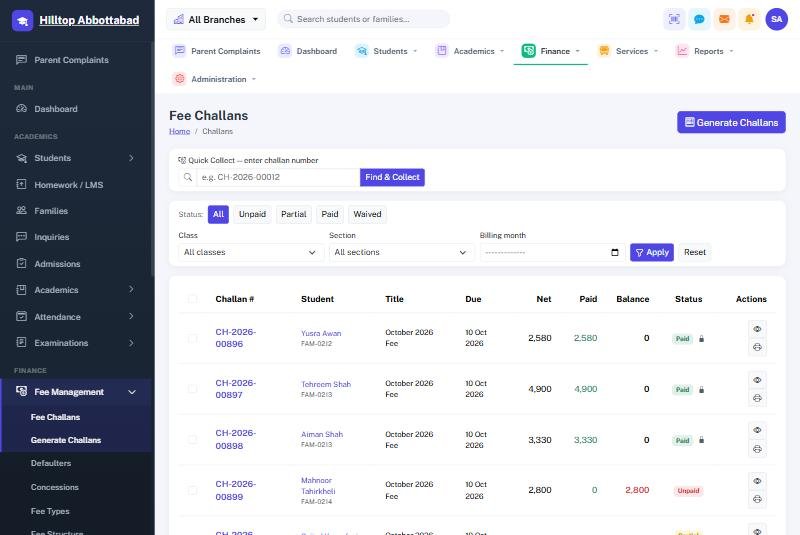
School Smart ERP bills fees to the family, so siblings share one challan. Challans for the whole school are generated in one click with every discount already applied, each payment posts straight into the accounts, and the defaulter list is always current — because it updates the moment a payment is recorded.
Fee Management in four steps
Set up fees once
Fee heads, class-wise structures and per-student overrides, with sibling rules and concessions.
Generate challans
The whole month for every class in one click — printed, or shown to parents in the app.
Collect anywhere
At the counter, from the staff app, or recorded from Easypaisa, JazzCash, cheque or bank.
Track & remind
Defaulter lists update themselves; SMS reminders are scheduled once and send themselves.
Everything in Fee Management
Fee heads & class structures
Tuition, admission, exam, transport, hostel and annual charges defined per class, with per-student overrides.
Family billing & sibling discounts
Siblings share one challan; sibling rules and concessions apply automatically every month.
Bulk challans
Generate and print the month's challans for the whole school in one click.
Payment methods posted to the books
Cash posts to cash in hand; Easypaisa, JazzCash, cheque and bank post to the bank account.
Defaulters & concessions
Live defaulter lists, arrears carried forward, and waivers recorded with a reason and an audit trail.
Offline fee counter
Take the day file out in two clicks and keep collecting through any outage — offline receipts carry their own number series, and the upload ignores duplicates.
Fee Management — FAQs
Can siblings share one fee challan?
Can parents pay through JazzCash or Easypaisa?
What happens on fee day when the internet is down?
Can we import our existing arrears?
Works together with
See Fee Management working for your school
We demo on your own data. Prefer to talk? Call 0333-9296314 or WhatsApp 0333-9180212.