
Offline School Management Software
When the internet or power goes, the fee counter keeps collecting with its own unique receipt numbers — and one checked upload posts everything when you are back online.
Load-shedding doesn't close your fee counter
Cloud software has real advantages, but in much of Pakistan it has one fatal weakness: when the connection drops, the counter stops. Office staff go back to a receipt book "just for today", and the two records never quite match again.
School Smart ERP is built for that. The offline fee counter takes the day file out in two clicks, keeps collecting on an office PC through any outage, and posts every receipt with one upload — checked first, and safe to upload twice. Only fee collection works offline: attendance, marks and admissions wait for the connection, because a parent standing at the window with cash cannot be asked to come back tomorrow.
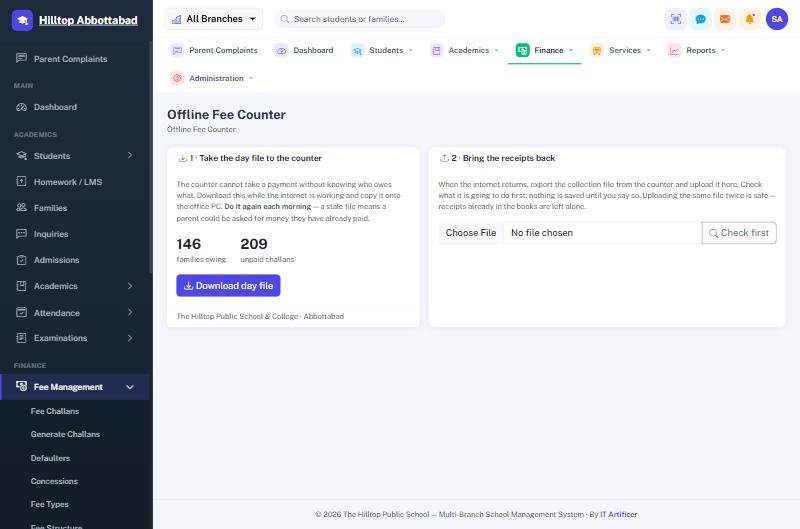
Offline Mode in four steps
Take the day out
Two clicks download the day's challans to the office PC.
Keep collecting
Receipts print in the school's usual format, numbered with the counter's own code.
Upload once
One upload posts every receipt into the system and the books.
Nothing doubles
Each payment is checked; uploading the same file twice never double-counts.
Everything in Offline Mode
Offline fee counter
Collect fees on an office PC through power or internet outages.
Unique offline receipt numbers
Offline receipts carry the counter's site code (e.g. RC-L1-2026-00001), so they never clash with the main system.
One-click upload
Everything posts into fees and accounts when the line returns.
Safe re-uploads
Uploading the same collection file twice never double-counts.
Altered files refused
Every collection file is checksummed — if a figure has been changed, the system will not accept it.
Built for Pakistan
Designed around load-shedding and weak mobile signal, not office broadband.
Offline Mode — FAQs
Do we need internet at the fee counter?
Can offline receipts clash with the main system?
What if someone uploads the same file twice?
Is the offline counter in every plan?
Works together with
See Offline Mode working for your school
We demo on your own data. Prefer to talk? Call 0333-9296314 or WhatsApp 0333-9180212.