
10. Fee management
The part of the system the office uses most. Fee heads say what is charged, the structure says how much per class, challans bill it, and receipts collect it — each receipt posting itself to the ledger as it is taken.
Setting the fees up
- Fee Types — the heads: tuition, admission, examination, computer lab, sports, transport, hostel.
- Fee Structure — the amount each class pays under each head.
- Concessions — a reduction for one child, as a percentage or an amount, on one head or on everything.
- Sibling Discounts — a rule that applies itself to the second and later children of a family.
- Payment Methods — the cash, bank and wallet accounts you collect into, with the account numbers printed on the slip.
Billing the month
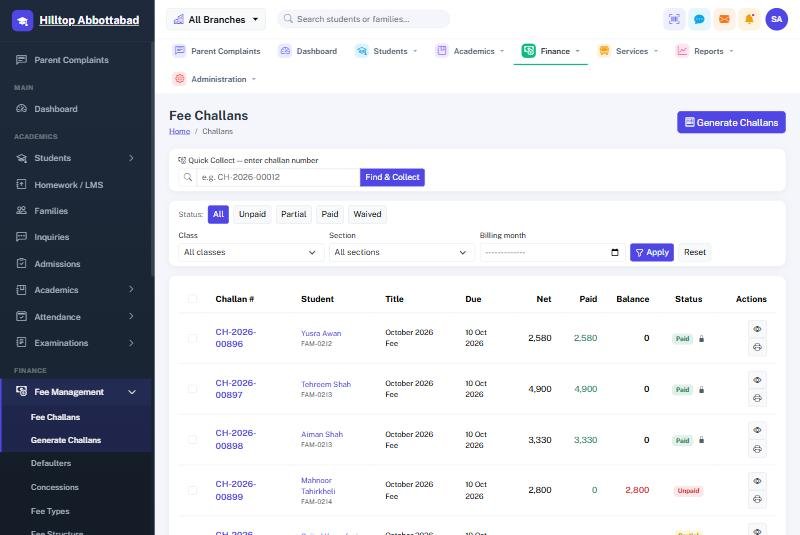
Generate Challans raises the month's bills for a class or for the whole school in one action, applying every concession and sibling rule as it goes. Challans print one to a page or several to a sheet, and carry a barcode so the counter can scan rather than type.
Taking a payment
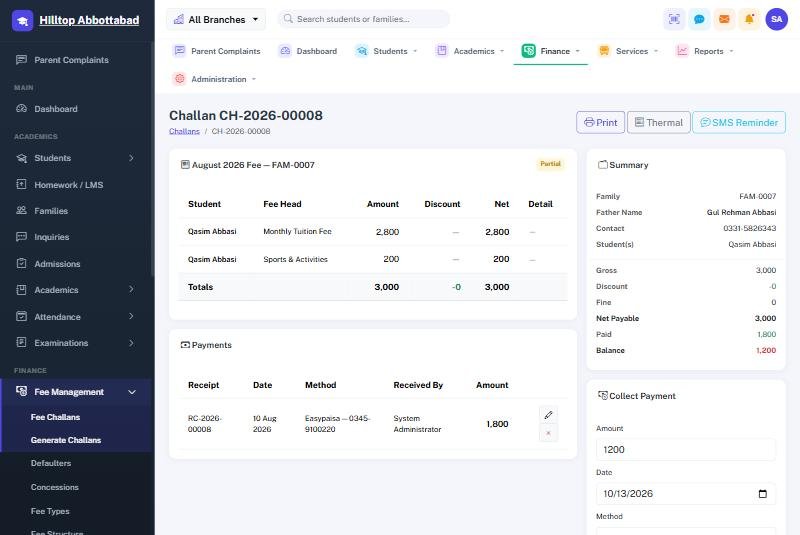
- Scan or type the challan number into Quick Collect, or find the child by name.
- Enter the amount — part payment is allowed and the balance stays on the challan.
- Choose how it was paid: cash, a bank account or a wallet.
- Save. The receipt number is issued, the receipt prints, and the ledger entry is posted.
Chasing what is owed
Defaulters lists every family with an overdue balance, oldest first, and can send the whole list a reminder by SMS in one action. The Fee Collection report shows what came in over any period, by method and by class.
Ready to see it live?
Book a free demo of School Smart ERP for your school or college.